Skip to content

QR code tracking

Every dynamic code counts its scans from the moment it is made, on every plan, with no tag to install and nothing to switch on. This page is about reading those numbers: which printed thing earned them, what a unique visitor is counting, and the places the figures stop short on purpose.

  • Counted from the first scan
  • No address ever stored
  • Country on Free
  • Town on Pro and Business

Which printed thing earned the scan

The question print money is spent to answer, and the only reliable way to get it.

Give every placement its own code. The window card, the flyer left on tables, the quarter-page in the local paper and the sticker on the van are four codes pointing at the same page, and four separate counts. When one of them climbs and three do not, you have learned where to spend next month rather than guessing from a single total.

Making four instead of one costs nothing on any plan: a spreadsheet of placements comes back as one code per row, already named, so the list reads like the campaign rather than like a set of random short links. Name them for the wall they go on, not for the page they open, because the destination is the thing they have in common.

What each code opens can still change afterwards. The count carries across a change of destination, so a code you re-point in March keeps the scans it earned in February, and the chart shows the change rather than starting again from zero.

What one unique visitor is counting

Worth knowing before you report the number to anybody else.

Alongside the scan total, each day carries a count of the distinct devices behind it. That figure is built from an identifier we derive at the moment of the scan: the network address and the browser string are mixed with the code’s own id and a key that is replaced at midnight UTC, and the result is what gets stored. The address is an ingredient, never a record.

Three consequences follow, and they all matter when someone asks what the number means. A person who scans the same poster three times before lunch is one visitor that day. The same person on Tuesday is a new visitor, because yesterday’s key is gone and the two cannot be lined up. And a person who scans two of your codes appears as two unrelated visitors, since each code has its own identifier — there is no path from one to the other, for us or for anyone holding the database.

That is a narrower claim than most tracking makes, and it is the deliberate one. It answers how many people a placement reached today without building a profile of any of them, and it means the honest sentence in a report is devices per day, not people.

Why print always arrives as direct

Not a gap in the data. It is what a camera is.

A browser following a link announces where it came from. A phone camera pointed at a printed square has nowhere to have come from, so those scans are filed as direct. It is recorded as an answer rather than left blank, because a marketer reading the column needs to know the difference between “from the printed run” and “we failed to capture it”.

A referring host appears when the code was scanned off a screen: a slide at a conference, a code in an email, a picture on somebody else’s site. Only the host is kept, never the full address of the page it sat on.

For what happens after the tap, campaign tags are the other half. Set them once as a preset and every code in the campaign arrives in your own analytics already labelled, so the scan count here and the sessions there describe the same visit. Presets come with Starter and above.

What every plan records, and what each plan shows

The distinction matters, because one of them is reversible and the other is not.

Every breakdown is recorded for every account from the first scan: country, region and town, device, operating system, browser, referring host, hour of the day and day of the week. What a plan changes is how much of it the dashboard will draw for you.

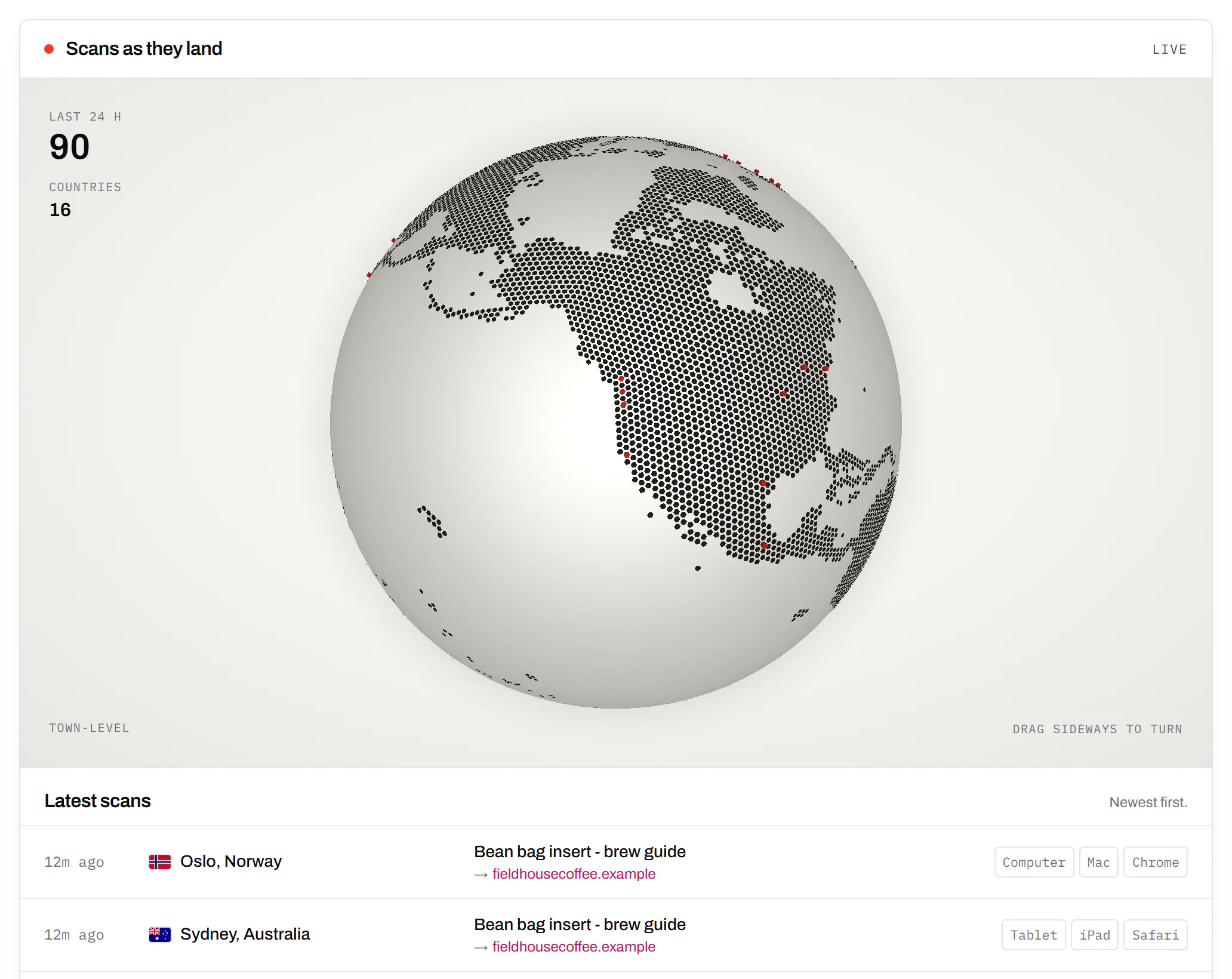
Free shows the country a code is scanned in, which is the question that makes somebody want the rest. Starter adds region, device, operating system, browser, the site a visitor came from, and the hour and weekday. Pro and Business add the town. The live map, where scans land as they happen, comes with Starter and up; a CSV of the raw daily figures comes with Pro and Business.

Because the collection never stopped, moving up a plan is not a switch that starts working next month. The breakdowns that were hidden were still being written, and they appear for the period you already have — up to 90 days on Free, 365 days on Starter, and the whole history above that.

Where the figures stop, on purpose

Four limits worth knowing before you build a report on them.

No address is ever stored. It is an input to the daily identifier and is discarded in the same breath. There is no column for it, which is a stronger promise than a policy: there is nowhere to put one even by mistake.

Towns are capped at a hundred a day. Beyond the hundred most-scanned places on a given day, the rest are added together as a single other. A campaign spread thinly across many small towns will see that line grow, and the individual names are not recoverable afterwards.

Individual scans are kept for 30 days. After that the daily totals, hours and breakdowns remain for as long as the code does, and the scan-by-scan rows behind them are gone. Anything that needs the raw detail should be exported inside that window.

Automated traffic is left out. Link previews and crawlers are identified and excluded before the day is totalled, so a code pasted into a chat app does not arrive with a dozen scans nobody made.

Tracking, answered

Does a QR code tell you who scanned it?
No, and ours is built so that it cannot. A scan is recorded with the time, the country the network says it came from, the kind of device, and a short identifier derived from the address and browser string. The address itself is used to build that identifier and is then thrown away: there is no column in the database to hold it, so no report, export or support request can produce one.
What does one unique visitor actually mean?
One device, one code, one day. Scan the same poster twice before lunch and you are one visitor; come back tomorrow and you are a new one, because the key behind that figure is replaced overnight. Scan a second code of yours and you appear there as somebody else entirely, since every code counts on its own.
Can I tell which poster or flyer a scan came from?
Yes, by giving each placement its own code rather than reprinting one. Two codes on two posters are two rows in the list with two counts, and the difference between them is the answer you are paying print money to learn. One code on everything can tell you how many scans arrived, never which wall earned them.
Why does the referrer column say direct?
Because a camera is not a link. A phone pointed at a printed square arrives with nothing to say where it had been, so that scan is filed as direct. A referring site shows up only when somebody scanned the code off a screen - a slide, an email, a web page - and even then we record the site, not the page.
How far back can I look?
Free shows the last 90 days, Starter 365 days, and Pro and Business keep the whole history. The window governs what the dashboard draws, not what is stored: the daily totals behind it are kept for as long as the code exists, so moving up a plan shows you the months that were already there.
What happens to the numbers if I delete the code?
They go with it. Deleting a code erases its row and every scan, day, hour and breakdown attached to it, and no export of them is kept afterwards. That is the honest consequence of a delete meaning delete, and it is worth exporting anything you still want before you press it.

The rest of the toolbox

Open a row to see the screen and which plan has it.

Custom domains

Short links on your own domain, chosen code by code.

Codes open go.yourbrand.com/menu rather than a link with our name in it, so the address under the code is yours. You add two DNS records and we check them. Then pick the domain for each code as you make it, or move a whole list of codes onto it at once.

Starter and up

QR codes on your own domain
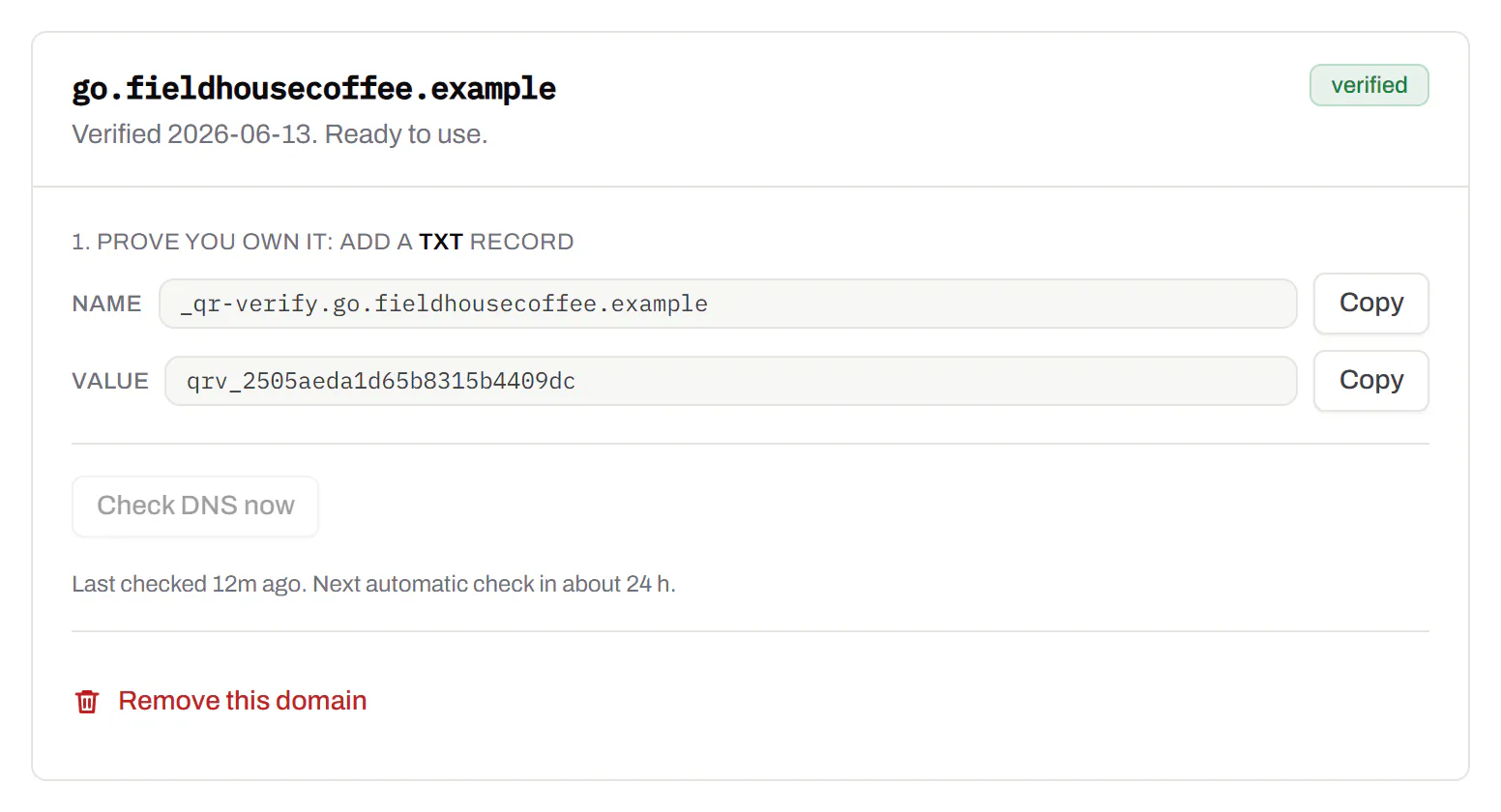
A verified custom domain, go.fieldhousecoffee.example, with the TXT and CNAME records to copy into DNS and a button to check them again.
Custom domains · verified sample data

Bulk QR code generator

A spreadsheet in, one dynamic code per row out.

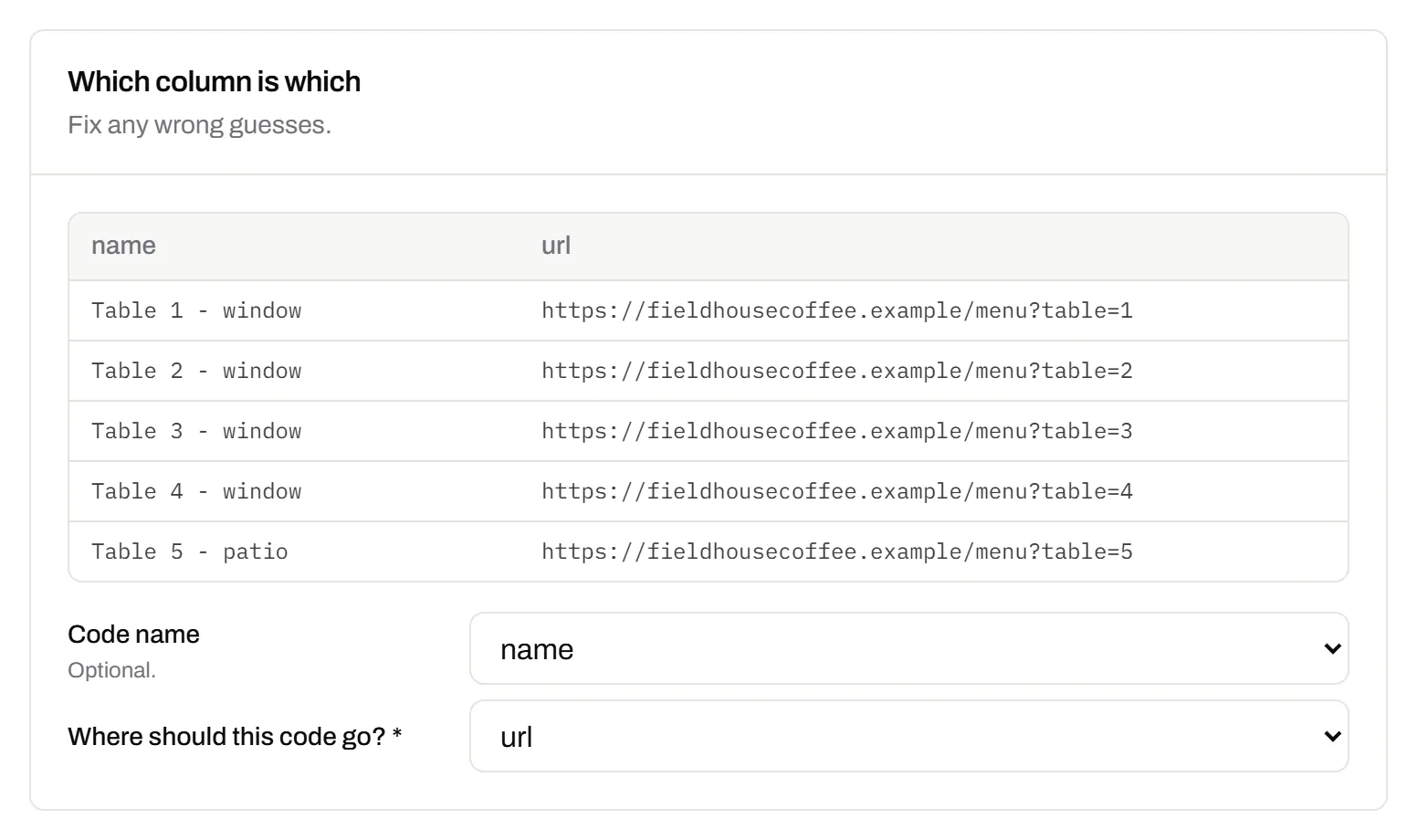
Paste or upload a list of names and links, match the columns, and get a dynamic code for every row - one per table, stall, badge or product - each with its own scans and destination.

Starter and up

The bulk generator
Bulk import after pasting a spreadsheet of twelve café tables - window, patio and bar - with the name and link columns matched to each new code’s name and destination.
Bulk import · twelve café tables sample data

Change many codes at once

Tick the codes, then pause, tag, file or move them together.

Tick codes in the list, or pick every code with a tag, and pause or resume them, add or remove tags, move them to a folder or onto your own domain, or add campaign tags, in one go. The API does the same in one request.

Pause and resume on every plan · folders and tags on Starter and up

An estate agent’s QR codes - yard signs for two listings, an open-house flyer and neighbourhood flyer drops - each with its short link on the agency’s own domain, its scan count and its folder.
Your QR codes · an estate agent’s list sample data

Short links, with your own ending

The link on its own, for a bio, an email or an ad.

Paste a link and get a short one you can change, route and count, with no QR code unless you want one. Every dynamic code already has its short link beside it, and a short link gets its QR code in one click - the same link, so clicks and scans count together. On Business you choose how the link ends, like /spring-menu, instead of random letters.

Every plan · custom endings on Business

The URL shortener
A short link’s settings: its short code with a Copy button, marked “Always works”, a custom ending on the roastery’s own domain, and the choice of which domain the link uses.
A short link · a coffee roaster’s bio link sample data

GS1 Digital Link for products

The retail code that carries your GTIN and still opens a web page.

Your domain and the GTIN from under the barcode, with batch, serial and dates if you want them, in the link format GS1 set for retail. A phone opens your page; the product data rides along in the address. The GTIN’s check digit is checked before anything is made.

Every plan, Free included

QR codes for packaging
Making a GS1 Digital Link code for a bag of coffee beans: the brand’s own domain, the GTIN from under the barcode and a batch number, beside a preview of the code the packaging will carry.
Create a code · GS1 Digital Link sample data

Wi-Fi, contact cards, email, phone and SMS

Networks, contacts, calendar dates and places, not only links.

A website, plain text, a Wi-Fi network, an email, a phone number, a text message, a contact card, a GS1 Digital Link, a PDF, a location, a calendar event and more. Most download free, with no account; the few marked “Editable only” need one.

Every plan, Free included

Contact card codes
The first step of making a code: a grid of the kinds of code on offer - website, plain text, Wi-Fi network, email, phone number, SMS message, contact card, GS1 Digital Link, PDF file, app store link, review request, location, calendar event and payment link, with PDF and app store marked editable only - Website chosen, and a preview of the code beside it.
Create a code · what to make sample data

PDF codes you can update

Upload a PDF, print the code, swap the file later.

We host the file and the code opens it. Upload a new version and the same printed code opens that one, with the old file kept in its history in case you need it back.

Every plan, Free included

PDF to QR code
Destination history for a café’s catering-menu PDF code: the summer and spring menus and last year’s, each replaced on a date with a note, and each one a button away from being restored.
A PDF code · file history sample data

Your logo in the middle

Upload any image; we size it so the code still scans.

PNG, JPEG, WebP or GIF, up to 15 MB - we shrink it ourselves, so nobody has to compress a file first. Error correction goes up to make room, and the logo is never allowed to cover more of the pattern than the code can lose.

Every plan, Free included

The design panel of a coffee roaster’s bag code: espresso modules on cream with the roaster’s bean roundel in the middle, the logo field, and error correction locked to Highest because the code has a logo.
A bag code · design with a logo sample data

Print-ready downloads

PNG and SVG on every plan, and a PDF for the printer.

PNG for screens and quick jobs, SVG for anything that gets scaled, and a print-ready PDF on Starter and up.

PNG and SVG on every plan · PDF on Starter and up

A table-tent code’s own page: the printed code in espresso brown with a SCAN FOR MENU label, its short link on the café’s own domain and PNG, SVG and PDF downloads, beside the address it opens and a box for a new one, with the note that changes apply without reprinting.
A code’s page · downloads sample data

Folders and tags

Keep one location’s or one campaign’s codes together.

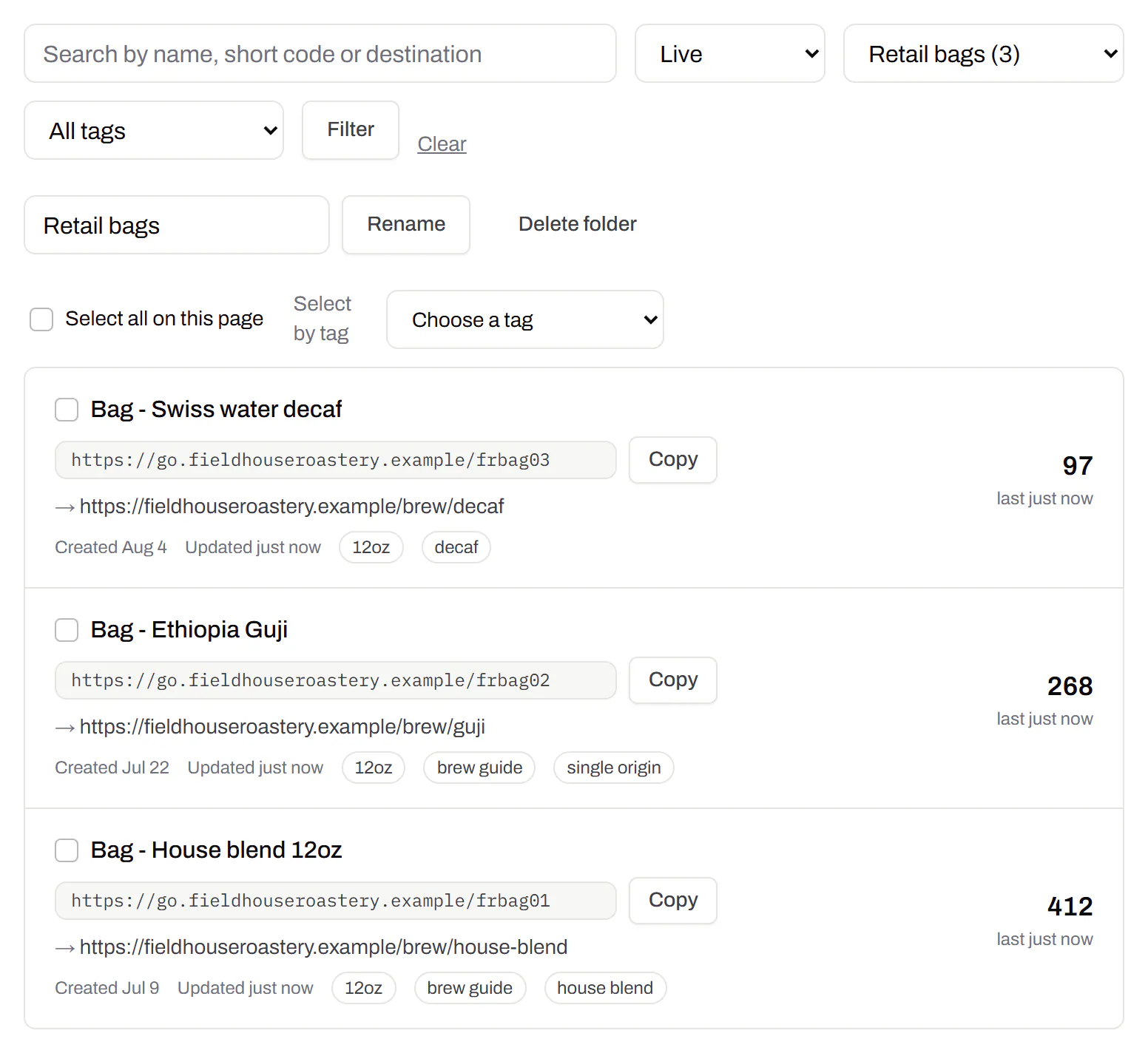
Put codes in a folder per shop, listing or campaign and filter the list by it. Deleting a folder never deletes a code - they move to No folder, and you can undo it.

Starter and up

A coffee roaster’s codes filtered to the Retail bags folder: the house blend, Ethiopia Guji and decaf bag codes, each with its tags - 12oz, house blend, single origin, brew guide, decaf - its short link and its scans.
Your QR codes · one folder, tagged sample data

Campaign presets

Saved UTM parameters, so printed scans are not “direct”.

A printed code arrives in your web analytics as direct traffic. A preset fills in source, medium and campaign in one click, so the flyer and the table tent show up as themselves.

Starter and up

A coffee company’s Spring flyers campaign preset: source flyer, medium print, campaign spring-2026 and content farmers-market, with a preview of the full link a scan of a code using the preset opens.
Settings · campaign presets sample data

City-level scan locations

Which towns the scans came from, not only which countries.

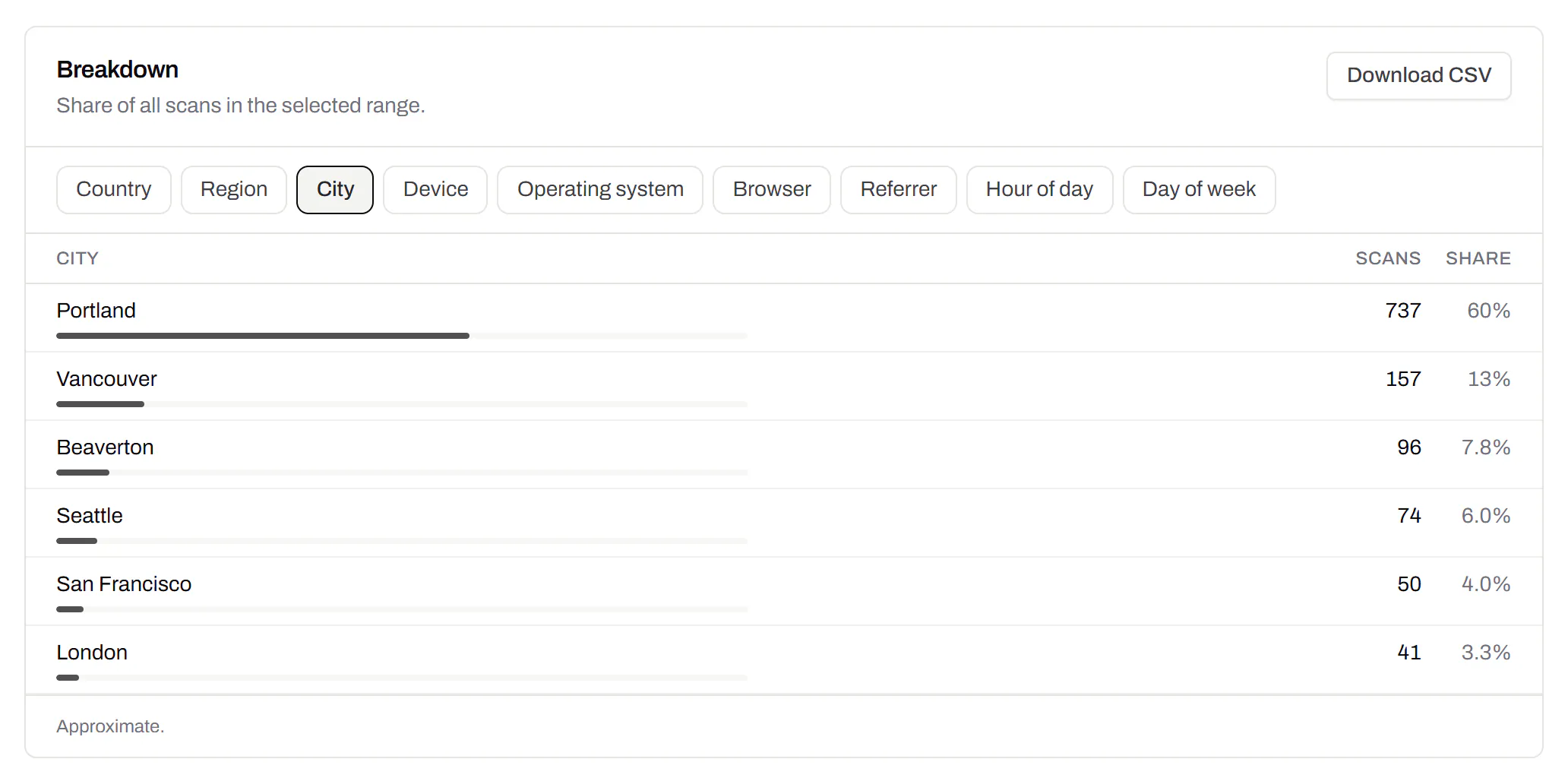
Scans by city and region for each code, and towns on the live map. Coarse on purpose: the place the phone’s network reports, never a street or a precise position.

Pro and Business

Scans of a café’s table-tent code by city, the top six: Portland with 60%, then Vancouver, Beaverton, Seattle, San Francisco and London, each with its count, a bar and its share.
A code’s analytics · city sample data

CSV export

Daily scans per code, in a spreadsheet.

Download scans and unique visitors by day for one code or all of them - with each code’s name and short link - as CSV for your own reports, or for whoever asked how the campaign did.

Pro and Business

The foot of a code’s analytics: the Breakdown card on referrers - every scan straight from the camera - with its own Download CSV button, and under it the Export panel, which downloads scans and visitors per day as CSV.
A code’s analytics · export sample data

Webhooks

Your server hears about every scan and every change.

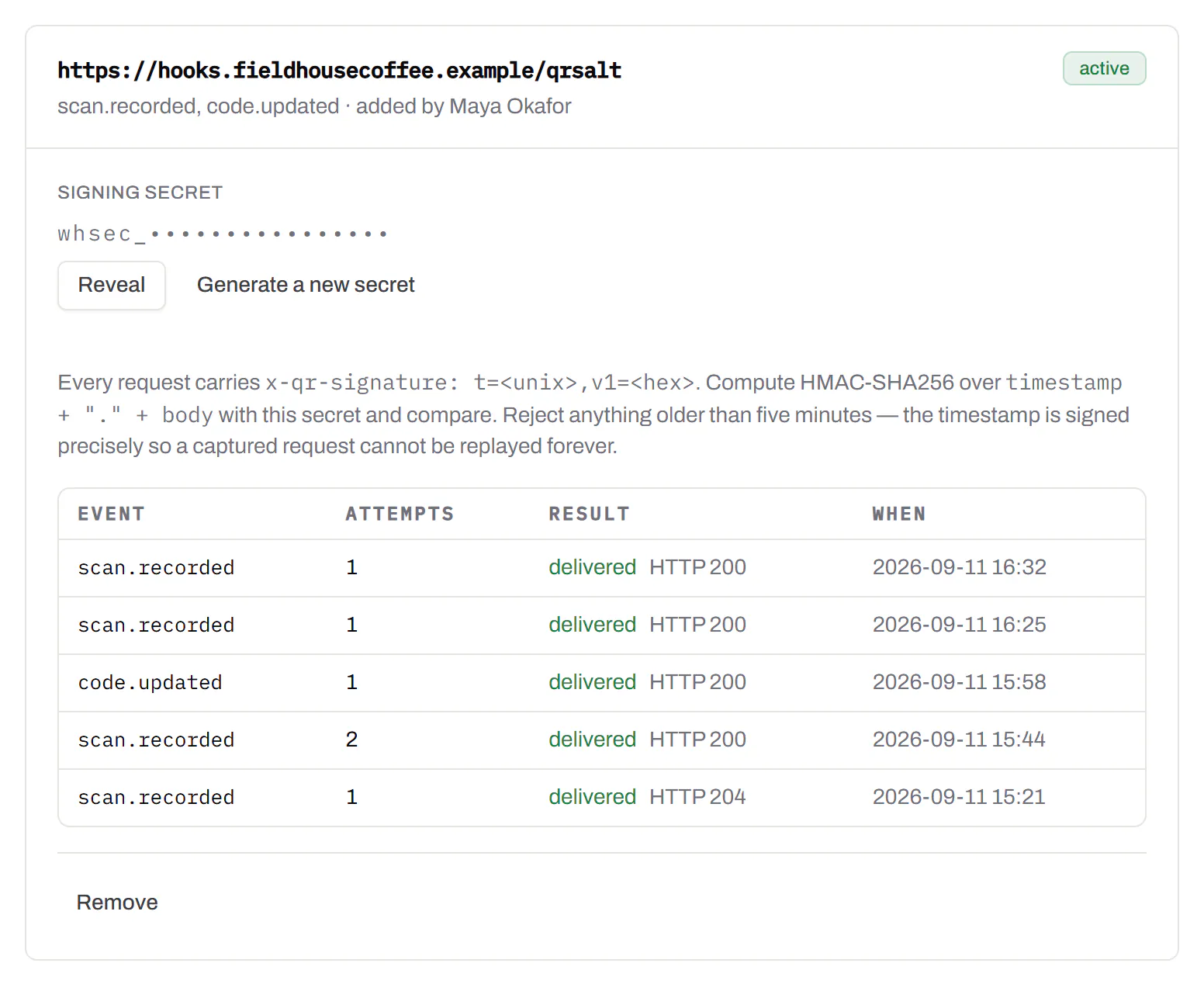
Pick the events - a scan, a code made or changed, a form answered, a QR Menu edited - and give us an address. Each one arrives as a signed POST, retried if your server is down, and every delivery is listed with the response it got.

Business

The API and webhooks
A webhook endpoint that hears about every scan and code update, with who set it up, a signing secret hidden until an owner or admin reveals it, and its last deliveries, each marked delivered with the response it got.
Webhooks · recent deliveries sample data

Separate workspaces

One subscription, a workspace per brand or client.

Each workspace has its own codes, team and analytics, so a client never sees another client’s. Up to 10 under one subscription.

Business

The Workspaces panel in settings: how many of the plan’s workspaces are in use, what happens to all of them if the subscription ends, and a field to name and create another one.
Settings · workspaces sample data

Priority email support

Paid plans’ emails are answered first.

A person reads every message. On a paid plan yours is answered before free accounts’ - an order we keep, not a promised hour. Your plan and workspace go along with it, so nobody has to ask which account is yours.

Starter and up

The support page on a Business plan: a note that a person reads every message and this plan’s is answered before free accounts’, a form to write in, and the plan and workspace that are sent along with it.
Contact support · Business plan sample data

Your data, to take or delete

A full export any time, and deletion you can take back.

Download everything - codes, history, scans, form answers and the files you uploaded - as one .zip with spreadsheets inside. Deleting the account gives you 30 days to change your mind, and your printed codes keep working until then.

Every plan, Free included

Account settings: a button to download everything the account holds, and a separate panel to delete the account, which can be undone for 30 days.
Settings · your data sample data

An API for the codes you print

A REST API for your own code: make dynamic codes and short links, change where they go, render SVG, PNG or PDF, add your domains and change hundreds of codes in one request. No-code tools like Zapier, Make and n8n can call it too, with a plain HTTP step. The API comes with Pro and up, and every request carries your key.

Render a code · Pro and up

curl -o code.svg \
  -H "Authorization: Bearer $QRSALT_KEY" \
  "https://app.qrsalt.com/api/qr?data=https://example.com"

An SVG back, ready for a label, a template or an image tag.

Re-point a printed code · Pro and up

curl -X PATCH https://app.qrsalt.com/api/v1/codes/{id} \
  -H "Authorization: Bearer $QRSALT_KEY" \
  -H "content-type: application/json" \
  -d '{"destination":"https://example.com/winter"}'

The printed code opens the new page, and the old one is kept in its history. Keys can only ever touch their own workspace.

Change many codes at once · JavaScript

// Move a campaign's codes onto your own domain
await fetch('https://app.qrsalt.com/api/v1/codes/bulk', {
  method: 'POST',
  headers: {
    authorization: `Bearer ${process.env.QRSALT_KEY}`,
    'content-type': 'application/json',
  },
  body: JSON.stringify({ ids, action: 'domain', domain: 'go.example.com' }),
})

Pause, tag, file or move codes in one call. The answer lists what changed and what was skipped.

Every endpoint, with a playground
The API screen listing a coffee company’s keys - one for a menu sync, one for a label printer, one revoked - each with its prefix, who created it, when it was made and when it was last used.
API keys · one per integration sample data
QR code tracking - see which print actually worked - QRSalt