
Google Maps QR code for directions
Type an address or paste a Google Maps link, and a scan opens the place in Google Maps. Free, no account.
Dynamic & Editable
Change where it points after printing, and see who scans it.
This is an example. Type a destination to download yours.
Design
Style
Colour#000000
Shapesquare
Body shape
Corner shape
Inside shape
Framenone
Logonone
Print settingsECC M
On this page
A pin people can’t misread
Signs go wrong at the address: a missed unit number, a car park round the back, a venue with two doors. Give the exact pin and the scan lands on it.
Coordinates to about 11 cm
We keep six decimal places, and a comma works as the decimal point. When you fill in both, the coordinates win.
Move the pin after printing
Save it as an editable code with a free account and change the place whenever you need to.
Which board sent people, and from where
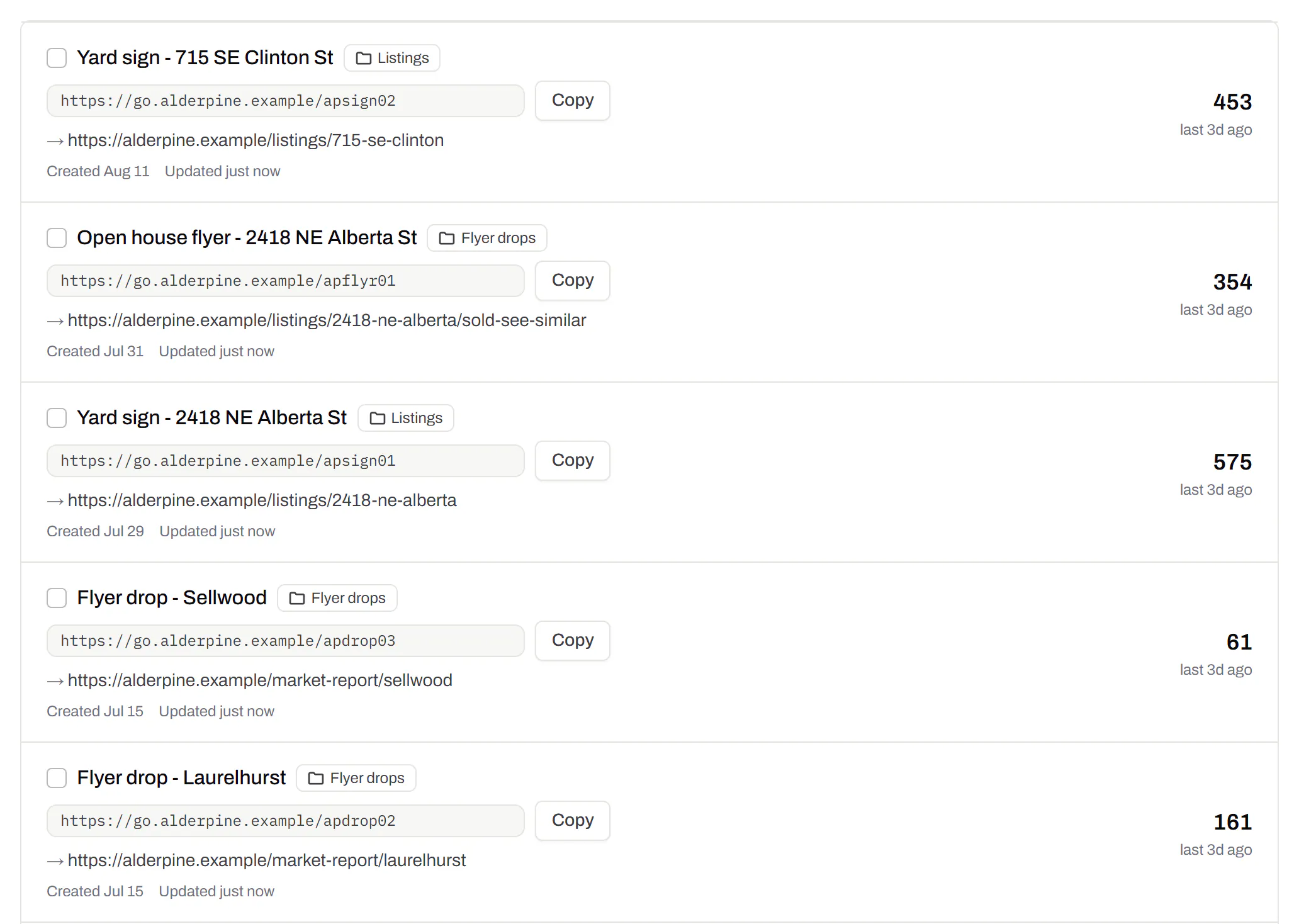
Every board and flyer drop with its own count
One code for the yard sign, one for the window card, one for the flyer: the list says which people follow. Folders by listing come with Starter and up.
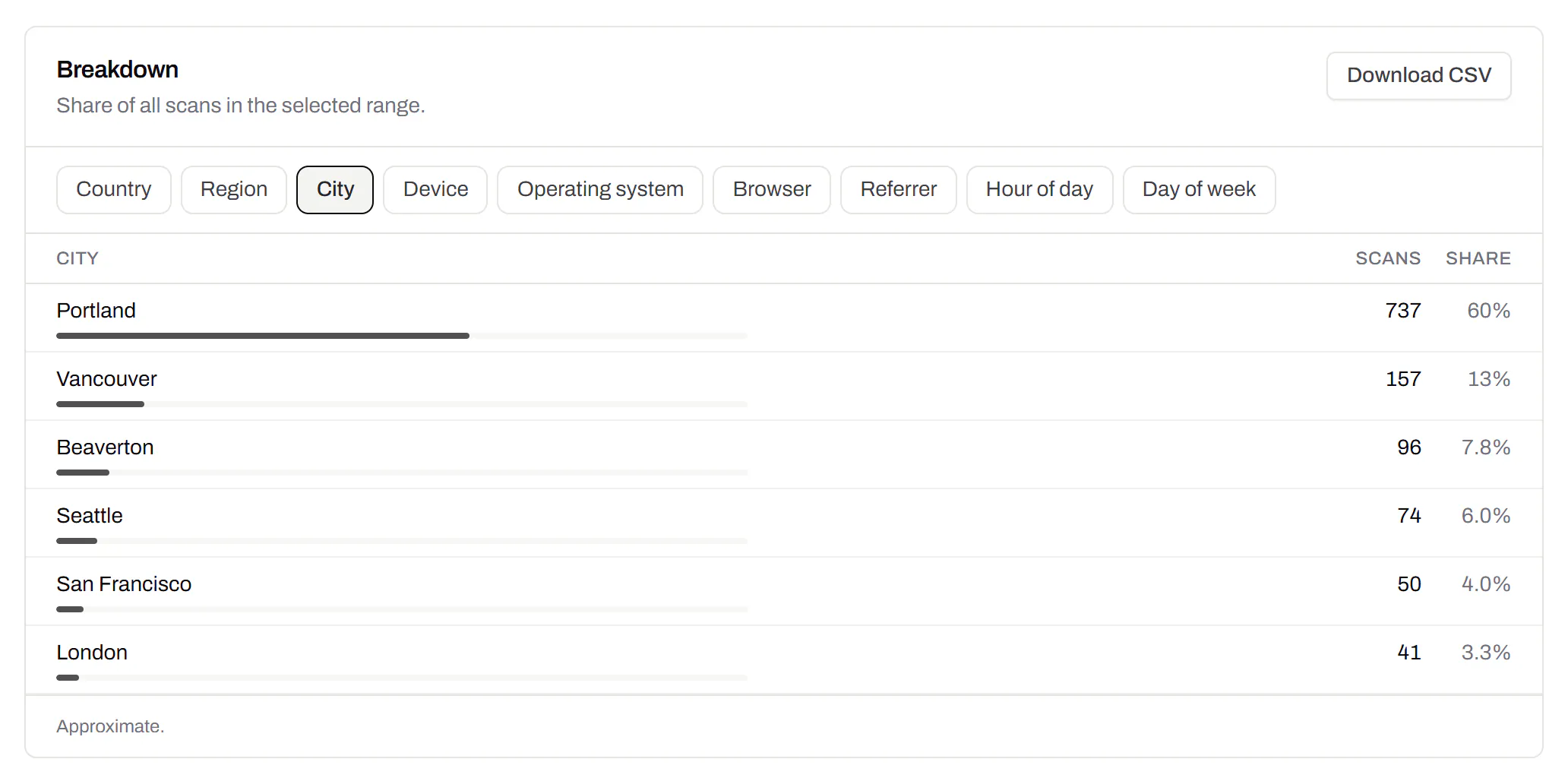
The towns your visitors scan in
Scans by country on every plan, and by town with Pro and Business. Never a street, and no IP address kept.
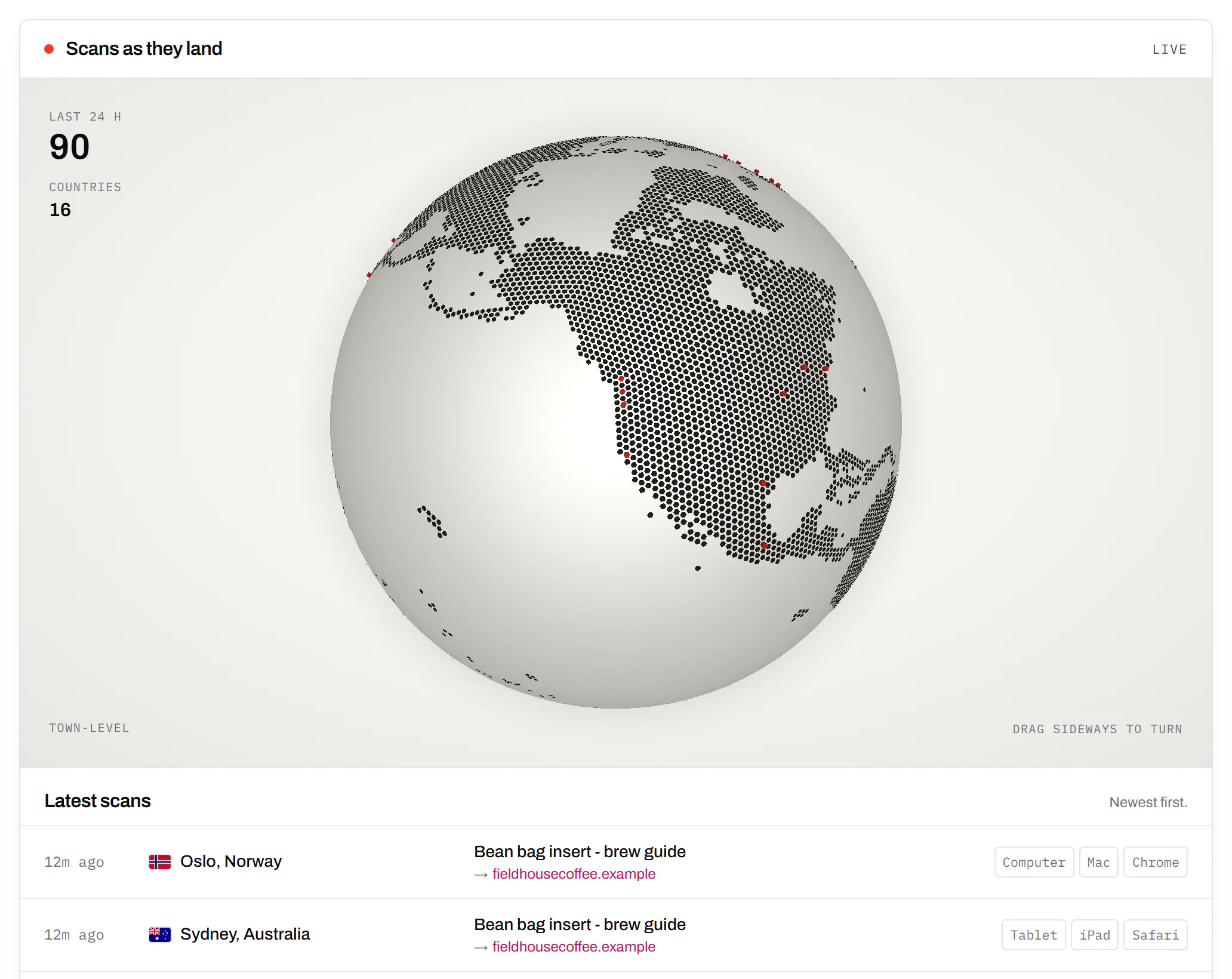
Watch a new sign start working
Dots appear on the globe within seconds of each scan. The Live Map comes with Starter and up.
Which map each phone opens
A static code holds one Google Maps link: it opens the Google Maps app where it’s installed and the browser where it isn’t. An editable code picks the map at each scan.
| Code | Scanned on | Opens |
|---|---|---|
| Static, no account | Any phone or computer | Google Maps |
| Editable | iPhone | Apple Maps, with your place name on the pin |
| Editable | Android, computer | Google Maps |
Safari on an iPad identifies itself as a Mac, so an iPad gets Google Maps. The static link for a pin looks like google.com/maps/search/?api=1&query=59.9075%2C10.7531.
Address, coordinates or a link
Any one of the three makes the code.
- An address for a place people can find by name: “14 Harbour Road, Bergen”.
- Coordinates for a spot with no address of its own: a field, a trailhead, a side door. Long-press the spot in Google Maps and copy the two numbers.
- A Google Maps link from the address bar: we read the pin out of it. A maps.app.goo.gl short link from Share hides the pin, so it’s kept whole and opens Google Maps everywhere.
Test the pin before you print
- Zoom all the way in. The pin should sit on the door people use, not the middle of the building.
- Press Directions. Check the route a stranger gets from the nearest main road.
- Scan from the sign’s distance: across the pavement, from the car, from the back of the queue.
- Editable code? Scan with an iPhone and an Android phone. Both maps should show the same spot.
Places that move
- Open houses: the same arrow boards, pointed at next Saturday’s property.
- Food trucks and market pitches: this week’s spot, not spring’s.
- Moving premises: the old window’s posters send people to the new address.
- Trails and hunts: change one leg without replacing the post.
Location codes, answered
How do I make a QR code for my location?
Type the address or paste the Google Maps link above, then download. A static code needs no account and never expires.
Why does the pin land on the wrong building?
The map app matches the address text, and the match can be off by a building or a street. Coordinates from the exact spot leave nothing to match.
Directions on an invitation? The event QR code puts the date in their calendar too. Branch networks can make location codes from their own systems with the QR code API.
Check it at the source
- Google Maps URLs. Read 20 October 2026. The link a static code holds, and where it opens
Last reviewed , against the product as it works today.
A pin that moves, and signs that count
Free includes 3 editable codes. Paid plans start at $5 a month for more signs, town-level scans and the Live Map.
Free
$0/mo
Unlimited static codes. Three editable ones that never expire.
- Short links on their own, no QR code needed
- Up to 1 of the 3 can be a QR Menu
- Add your logo to QR codes
- Every shape, corner and frame
3dynamic codes
Starter
Recommended$5/mo
For one business with codes out in the world.
- 5 QR Menus
- QR Forms
- GS1 Digital Links we host, so a printed pack can be re-pointed
- Advanced tracking and analytics
100dynamic codes
Pro
$15/mo
For agencies and teams running codes at scale.
- 50 QR Menus
- Unlimited analytics history
- 10 custom domains
- 5,000 API requests a month
600dynamic codes
Business
$39/mo
For organisations running codes across many brands.
- 400 QR Menus
- 50 custom domains
- Up to 25 team members and team management
- Up to 10 workspaces
2,000dynamic codes
Unlimited scans on every plan. Cancel online in two clicks. Compare every plan and feature
The rest of the toolbox
Open a row to see the screen and which plan has it.
Wi-Fi, contact cards, email, phone and SMS
Networks, contacts, calendar dates and places, not only links.Every plan, Free included
Website, text, Wi-Fi, email, phone, SMS, contact card, GS1 Digital Link, PDF, location, calendar event and more. Most download free with no account; the ones marked “Editable only” need one.
Every plan, Free included
Contact card codes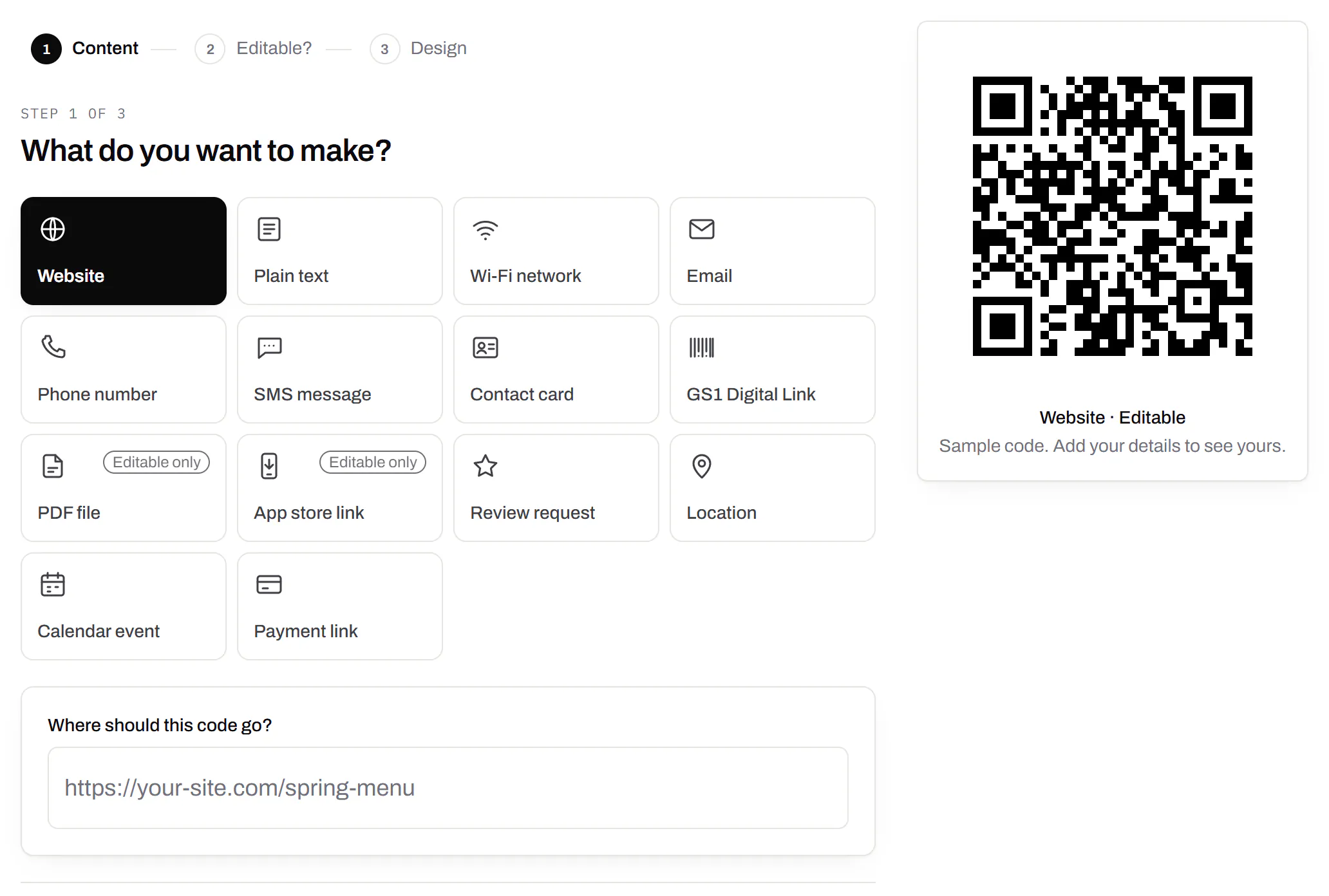
Your logo in the middle
Upload any image; we size it so the code still scans.Every plan, Free included
PNG, JPEG, WebP or GIF, up to 15 MB. We raise the error correction for it and never let it cover more than the code can lose.
Every plan, Free included

Print-ready downloads
Files for the screen, and one for the printer.PNG and SVG on every plan · PDF on Starter and up
PNG and SVG on every plan, and a print-ready PDF on Starter and up.
PNG and SVG on every plan · PDF on Starter and up

City-level scan locations
Which towns the scans came from, not only which countries.Pro and Business
Scans by city and region for each code, and towns on the Live Map. It’s the place the phone’s network reports, never a street.
Pro and Business