Skip to content

SVG QR code generator

Type a link and take the vector file: an SVG holds up from a business card to a building wrap, and the PNG beside it is 1,024 pixels wide. Both are free, with no account and nothing stamped across them.

Dynamic & Editable

Change where it points after printing, and see who scans it.

Your code is drawn as you type.

Type a destination to download.

This is an example code. Style it now — yours takes its place as you type.

Design

Style

Colour#000000
Shapesquare

Body shape

Corner shape

Inside shape

Framenone
Logonone
Print settingsECC M
  • Vector SVG, free
  • PNG 1,024 px wide
  • PDF on Starter and up
  • No watermark

The files this makes, and who asks for which

Four ways a code leaves here. The difference that matters is vector or pixels: one is a drawing that is redrawn at every size, the other a picture with a fixed number of squares in it.

SVG
Vector: the squares are shapes with coordinates, not pixels, so the file is the same 30-odd kilobytes whether it ends up on a sticker or a lorry. This is the one designers, sign makers and engravers ask for by name.
Free on this page, and on every plan
PNG
A flat picture 1,024 pixels wide, with the height following whatever frame you chose. It is what a phone, a slide, a document and most websites accept without a thought.
Free too, on every plan
PDF
Vector again, on a page cut to the artwork exactly: 40 mm wide by default, up to 1,000 mm. A printer places it at 100% and gets the size that was asked for, with no scaling to argue about.
In your account, on Starter and up
Through the API
One request renders SVG, PNG, JPG, WebP or PDF: pixel formats from 64 to 2,000 pixels wide (512 unless you say otherwise), and PDF in millimetres, for a system that makes labels or tickets on its own.
Pro and Business

What “high resolution” means for a QR code

Less than it does for a photograph. A code is a grid of identical squares, and a camera only has to tell one square from its neighbour, so what matters is how much room each square gets on the paper.

That makes the arithmetic short. The PNG here is 1,024 pixels across; at the 300 dots per inch a print shop works to, those pixels cover roughly 87 millimetres. Below that width it is as sharp as anything else on the page. Above it, the squares begin to blur at their edges, and the answer is not a bigger bitmap but a vector file, which has no pixels to run out of: the same SVG draws a 15 mm code on a business card and a two-metre one on a hoarding, each at the full resolution of whatever prints it.

It also means an enormous file buys nothing on its own. A code with a short link in it has few modules and reads happily at modest sizes; one carrying a long address, a contact card or a logo has many more, each needing its share of the paper. If a printed code refuses to scan, it is usually the physical width, the margin or the contrast at fault rather than the pixel count.

How big to print it

Four things decide whether a code scans off a printed sheet, and only one of them is the file.

  • Ten to one, for distance. The old rule of thumb still holds: a code reads comfortably from about ten times its own width. Two centimetres for a menu in somebody’s hands, ten for a poster across a room, a great deal more for a code people see from a car.
  • Leave the quiet zone alone. The blank margin is part of the code, not padding around it: the standard asks for four modules of clear space, which is what the margin control is set to. Crop into it, or run artwork up to the edge, and cameras lose the pattern’s boundary.
  • Dark on light, always. Cameras look for dark squares on a light ground. Inverting that, or pairing two colours of similar lightness, is the commonest reason a beautiful code will not scan; the design controls warn when contrast drops too far.
  • Test the file you are sending. Print one at the real size on the real material, and scan it with an ordinary phone at the distance people will stand. Glossy stock under a hard light and a code across a fold are both things a screen preview will never show you.

The margin control on this page is set to 4 modules to begin with, and the number is in the design panel if a job needs more. Codes going onto packaging have a few rules of their own, which are on the packaging page, and a code that might have to point somewhere else after the print run should be a dynamic one before it goes to press.

What is actually in the SVG

Worth knowing, because it explains what a designer can and cannot do with the file once it is open.

  • Shapes, not a picture. The file is text: a box that defines the drawing area, then the modules as shapes with coordinates. Illustrator, Inkscape, Figma, Affinity and every browser open it without a plug-in.
  • Colours written as hex. Foreground, background and the eye colour sit in the markup as plain values, so a designer can retint the code in seconds. Keep the dark part dark, and the code goes on scanning.
  • No font travels with it. The pattern needs no type at all. A frame’s caption in the PDF is set in Helvetica, which every reader already has, so there is no font file to chase and nothing to outline.
  • The logo is a passenger. Your logo sits inside the file as the image you uploaded rather than as shapes. It scales with everything else, and its own sharpness is the sharpness of the file you gave us.
  • Do not nudge the parts. The squares are one artwork, not a pattern to be restyled by hand. Recolour it, scale it, place it; move or delete modules and it stops being a code.
  • It is small. Tens of kilobytes, whatever size it is printed at, so it travels in an email to the printer without anybody zipping anything.

A width for the usual jobs

Worked from the distance each one is read at, so treat them as starting points to test rather than specifications. A code carrying a long address needs the larger end of each range.

Suggested printed widths by reading distance
Where it goesRead fromSomewhere near
Business card or labelIn the hand, 20-25 cm20 to 25 mm
Menu, table card, packagingAcross a table, 30-50 cm30 to 50 mm
Flyer or A4 poster on a wallA step away, about 1 m80 to 100 mm
Shop window or exhibition panelFrom the pavement, 2-3 m200 to 300 mm
Banner, hoarding or vehicleAcross a room or a street, 5 m and up500 mm and up

Two things bend these numbers. A phone held by somebody with a steady hand and a recent camera manages a good deal smaller; a code on a curved bottle, a textured bag or a wall people can only approach from an angle wants more. When a job matters, print one at each of two sizes and let a phone pick the winner.

Handing it over

What a printer, a sign maker or a colleague needs to know when the file lands in their inbox.

  • It is artwork, not a photograph. Place it at 100%, scale it proportionally if the layout demands, and do not let anyone “sharpen” or re-save it as a compressed picture.
  • The caption is set in Helvetica. A frame’s line of text in the PDF uses one of the fonts every reader already has, so no font file has to travel with the job.
  • Colours are RGB. Both vector files declare their inks in RGB. Converting for press is the same job as any other artwork, and a flat, dark colour on a light ground survives it best.
  • Keep the original. Store the SVG with the rest of the brand files. Re-exporting from a PDF a printer sent back, or from a screenshot of a proof, is how a code quietly loses its margin.

Check it at the source

Last reviewed , against the product as it works today.

Vector files are free; the PDF comes with a plan

SVG and PNG downloads cost nothing and need no account, on as many codes as you like. Print-ready PDF export is part of Starter and up, from $12 a month, alongside editable codes and scan counts.

Free

Free

Unlimited static codes. Three editable ones that never expire.

  • Unlimited static QR codes, forever
  • 3 editable items in total — dynamic QR codes, QR Menus and QR Forms share them
  • Dynamic codes never expire, and each comes with a short link
  • Short links on their own, no QR code needed

3dynamic codes

Starter

$12/mo

For one business with codes out in the world.

  • 5 QR Menus
  • QR Forms
  • Advanced tracking and analytics
  • Live map of scans as they happen

100dynamic codes

Pro

Most chosen

$39/mo

For agencies and teams running codes at scale.

  • 50 QR Menus
  • Unlimited analytics history
  • 10 custom domains
  • API access

600dynamic codes

Business

$99/mo

For organisations running codes across many brands.

  • 400 QR Menus
  • 50 custom domains
  • Up to 25 team members and team management
  • Up to 10 workspaces

2,000dynamic codes

Unlimited scans on every plan. Cancel online in two clicks. Compare every plan and feature

The rest of the toolbox

Open a row to see the screen and which plan has it.

Custom domains

Short links on your own domain, chosen code by code.

Codes open go.yourbrand.com/menu rather than a link with our name in it, so the address under the code is yours. You add two DNS records and we check them. Then pick the domain for each code as you make it, or move a whole list of codes onto it at once.

Starter and up

QR codes on your own domain
A verified custom domain, go.fieldhousecoffee.example, with the TXT and CNAME records to copy into DNS and a button to check them again.
Custom domains · verified sample data

Bulk QR code generator

A spreadsheet in, one dynamic code per row out.

Paste or upload a list of names and links, match the columns, and get a dynamic code for every row - one per table, stall, badge or product - each with its own scans and destination.

Starter and up

The bulk generator
Bulk import after pasting a spreadsheet of twelve café tables - window, patio and bar - with the name and link columns matched to each new code’s name and destination.
Bulk import · twelve café tables sample data

Change many codes at once

Tick the codes, then pause, tag, file or move them together.

Tick codes in the list, or pick every code with a tag, and pause or resume them, add or remove tags, move them to a folder or onto your own domain, or add campaign tags, in one go. The API does the same in one request.

Pause and resume on every plan · folders and tags on Starter and up

An estate agent’s QR codes - yard signs for two listings, an open-house flyer and neighbourhood flyer drops - each with its short link on the agency’s own domain, its scan count and its folder.
Your QR codes · an estate agent’s list sample data

Short links, with your own ending

The link on its own, for a bio, an email or an ad.

Paste a link and get a short one you can change, route and count, with no QR code unless you want one. Every dynamic code already has its short link beside it, and a short link gets its QR code in one click - the same link, so clicks and scans count together. On Business you choose how the link ends, like /spring-menu, instead of random letters.

Every plan · custom endings on Business

The URL shortener
A short link’s settings: its short code with a Copy button, marked “Always works”, a custom ending on the roastery’s own domain, and the choice of which domain the link uses.
A short link · a coffee roaster’s bio link sample data

GS1 Digital Link for products

The retail code that carries your GTIN and still opens a web page.

Your domain and the GTIN from under the barcode, with batch, serial and dates if you want them, in the link format GS1 set for retail. A phone opens your page; the product data rides along in the address. The GTIN’s check digit is checked before anything is made.

Every plan, Free included

QR codes for packaging
Making a GS1 Digital Link code for a bag of coffee beans: the brand’s own domain, the GTIN from under the barcode and a batch number, beside a preview of the code the packaging will carry.
Create a code · GS1 Digital Link sample data

Wi-Fi, contact cards, email, phone and SMS

Networks, contacts, calendar dates and places, not only links.

A website, plain text, a Wi-Fi network, an email, a phone number, a text message, a contact card, a GS1 Digital Link, a PDF, a location, a calendar event and more. Most download free, with no account; the few marked “Editable only” need one.

Every plan, Free included

Contact card codes
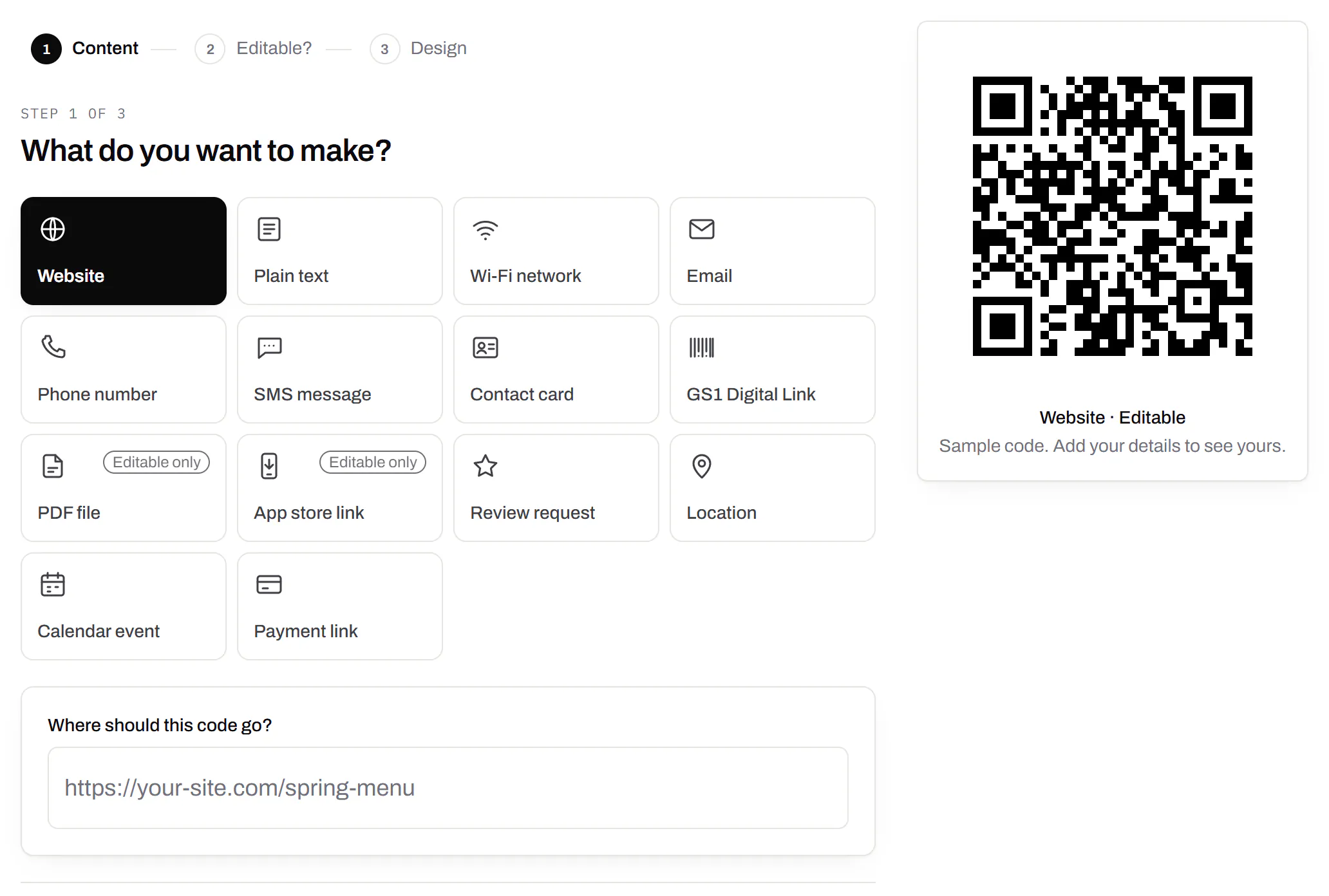
The first step of making a code: a grid of the kinds of code on offer - website, plain text, Wi-Fi network, email, phone number, SMS message, contact card, GS1 Digital Link, PDF file, app store link, review request, location, calendar event and payment link, with PDF and app store marked editable only - Website chosen, and a preview of the code beside it.
Create a code · what to make sample data

PDF codes you can update

Upload a PDF, print the code, swap the file later.

We host the file and the code opens it. Upload a new version and the same printed code opens that one, with the old file kept in its history in case you need it back.

Every plan, Free included

PDF to QR code
Destination history for a café’s catering-menu PDF code: the summer and spring menus and last year’s, each replaced on a date with a note, and each one a button away from being restored.
A PDF code · file history sample data

Your logo in the middle

Upload any image; we size it so the code still scans.

PNG, JPEG, WebP or GIF, up to 15 MB - we shrink it ourselves, so nobody has to compress a file first. Error correction goes up to make room, and the logo is never allowed to cover more of the pattern than the code can lose.

Every plan, Free included

The design panel of a coffee roaster’s bag code: espresso modules on cream with the roaster’s bean roundel in the middle, the logo field, and error correction locked to Highest because the code has a logo.
A bag code · design with a logo sample data

Print-ready downloads

PNG and SVG on every plan, and a PDF for the printer.

PNG for screens and quick jobs, SVG for anything that gets scaled, and a print-ready PDF on Starter and up.

PNG and SVG on every plan · PDF on Starter and up

A table-tent code’s own page: the printed code in espresso brown with a SCAN FOR MENU label, its short link on the café’s own domain and PNG, SVG and PDF downloads, beside the address it opens and a box for a new one, with the note that changes apply without reprinting.
A code’s page · downloads sample data

Folders and tags

Keep one location’s or one campaign’s codes together.

Put codes in a folder per shop, listing or campaign and filter the list by it. Deleting a folder never deletes a code - they move to No folder, and you can undo it.

Starter and up

A coffee roaster’s codes filtered to the Retail bags folder: the house blend, Ethiopia Guji and decaf bag codes, each with its tags - 12oz, house blend, single origin, brew guide, decaf - its short link and its scans.
Your QR codes · one folder, tagged sample data

Campaign presets

Saved UTM parameters, so printed scans are not “direct”.

A printed code arrives in your web analytics as direct traffic. A preset fills in source, medium and campaign in one click, so the flyer and the table tent show up as themselves.

Starter and up

A coffee company’s Spring flyers campaign preset: source flyer, medium print, campaign spring-2026 and content farmers-market, with a preview of the full link a scan of a code using the preset opens.
Settings · campaign presets sample data

City-level scan locations

Which towns the scans came from, not only which countries.

Scans by city and region for each code, and towns on the live map. Coarse on purpose: the place the phone’s network reports, never a street or a precise position.

Pro and Business

Scans of a café’s table-tent code by city, the top six: Portland with 60%, then Vancouver, Beaverton, Seattle, San Francisco and London, each with its count, a bar and its share.
A code’s analytics · city sample data

CSV export

Daily scans per code, in a spreadsheet.

Download scans and unique visitors by day for one code or all of them - with each code’s name and short link - as CSV for your own reports, or for whoever asked how the campaign did.

Pro and Business

The foot of a code’s analytics: the Breakdown card on referrers - every scan straight from the camera - with its own Download CSV button, and under it the Export panel, which downloads scans and visitors per day as CSV.
A code’s analytics · export sample data

Webhooks

Your server hears about every scan and every change.

Pick the events - a scan, a code made or changed, a form answered, a QR Menu edited - and give us an address. Each one arrives as a signed POST, retried if your server is down, and every delivery is listed with the response it got.

Business

The API and webhooks
A webhook endpoint that hears about every scan and code update, with who set it up, a signing secret hidden until an owner or admin reveals it, and its last deliveries, each marked delivered with the response it got.
Webhooks · recent deliveries sample data

Separate workspaces

One subscription, a workspace per brand or client.

Each workspace has its own codes, team and analytics, so a client never sees another client’s. Up to 10 under one subscription.

Business

The Workspaces panel in settings: how many of the plan’s workspaces are in use, what happens to all of them if the subscription ends, and a field to name and create another one.
Settings · workspaces sample data

Priority email support

Paid plans’ emails are answered first.

A person reads every message. On a paid plan yours is answered before free accounts’ - an order we keep, not a promised hour. Your plan and workspace go along with it, so nobody has to ask which account is yours.

Starter and up

The support page on a Business plan: a note that a person reads every message and this plan’s is answered before free accounts’, a form to write in, and the plan and workspace that are sent along with it.
Contact support · Business plan sample data

Your data, to take or delete

A full export any time, and deletion you can take back.

Download everything - codes, history, scans, form answers and the files you uploaded - as one .zip with spreadsheets inside. Deleting the account gives you 30 days to change your mind, and your printed codes keep working until then.

Every plan, Free included

Account settings: a button to download everything the account holds, and a separate panel to delete the account, which can be undone for 30 days.
Settings · your data sample data

An API for the codes you print

A REST API for your own code: make dynamic codes and short links, change where they go, render SVG, PNG or PDF, add your domains and change hundreds of codes in one request. No-code tools like Zapier, Make and n8n can call it too, with a plain HTTP step. The API comes with Pro and up, and every request carries your key.

Render a code · Pro and up

curl -o code.svg \
  -H "Authorization: Bearer $QRSALT_KEY" \
  "https://app.qrsalt.com/api/qr?data=https://example.com"

An SVG back, ready for a label, a template or an image tag.

Re-point a printed code · Pro and up

curl -X PATCH https://app.qrsalt.com/api/v1/codes/{id} \
  -H "Authorization: Bearer $QRSALT_KEY" \
  -H "content-type: application/json" \
  -d '{"destination":"https://example.com/winter"}'

The printed code opens the new page, and the old one is kept in its history. Keys can only ever touch their own workspace.

Change many codes at once · JavaScript

// Move a campaign's codes onto your own domain
await fetch('https://app.qrsalt.com/api/v1/codes/bulk', {
  method: 'POST',
  headers: {
    authorization: `Bearer ${process.env.QRSALT_KEY}`,
    'content-type': 'application/json',
  },
  body: JSON.stringify({ ids, action: 'domain', domain: 'go.example.com' }),
})

Pause, tag, file or move codes in one call. The answer lists what changed and what was skipped.

Every endpoint, with a playground
The API screen listing a coffee company’s keys - one for a menu sync, one for a label printer, one revoked - each with its prefix, who created it, when it was made and when it was last used.
API keys · one per integration sample data

File formats and print sizes, answered

How do I get a QR code as an SVG?
Type your link above and press Download SVG. There is no account, no email address and no watermark; the file that arrives is the one you can hand to a designer.
What resolution is the PNG?
1,024 pixels wide. Laid down at 300 dots per inch, the usual figure for print, that covers about 87 mm before the squares start to soften; beyond that size, send the SVG or the PDF instead.
Can I get a higher resolution QR code?
A vector file has no resolution to raise: the SVG and the PDF are drawn at whatever size they are placed, sharply. If you need a very large bitmap, the API renders one up to 2,000 pixels wide, and comes with Pro and Business.
Which file should I send my printer?
SVG, or PDF if they ask for a page rather than an asset. Both are vector, so they place your code at any size without the stepped edges that give away an enlarged screenshot. Keep the PNG for screens and documents.
Does the PDF come at a fixed size?
The page is the artwork, 40 mm across unless a different width is asked for, so it prints at 100% with nothing to scale. Being vector, it survives being scaled anyway if the job changes.
Will my logo stay sharp?
The code around it is vector, and stays crisp at any size. The logo is the picture you uploaded, sitting inside that file, so give it as large and clean an image as you have if the code is going on something big.
Does resizing a QR code break it?
Not by itself, as long as the whole artwork is scaled together and the blank margin goes with it. What breaks codes is stretching one axis, cropping the margin, or enlarging a small PNG until its edges turn to mush.
What colour mode are the files?
Colours are written as RGB, which is what SVG uses and what the PDF declares. A print shop converts to their own inks as they would for any artwork; if a brand colour has to be exact, give them its reference and let them set it.
SVG QR code generator - PNG, SVG and PDF - QRSalt