Skip to content

Read a QR code or barcode from an image

Drop in a screenshot or a photo and see what is inside it. Free, no account, and the picture is not kept.

Drop an image here, paste a screenshot, or choose a file.

PNG, JPEG or WebP, up to 12 MB. The image is sent to our server, read, and then discarded: it is never written to disk, logged or shown to anyone, and what was in the code is not kept either. Nothing here needs an account.

The text inside the code appears here, along with what kind of code it turned out to be.

  • Eight kinds of code
  • No account
  • Nothing stored
  • Links are never opened for you

Which codes it reads

One upload is searched for all eight. You do not have to know which kind you are holding.

QR code
Square codes on posters, packs, menus, tickets and screens.
Data Matrix
The small square on electronics, medicines and labels where there is no room for a QR.
Aztec
Rail and airline tickets, where the code has to survive a crumpled printout.
PDF417
The wide stack on driving licences, boarding passes and shipping paperwork.
EAN-13 and UPC-A
The retail barcode under a price. UPC-A comes back as a thirteen-digit EAN, because that is what it is.
Code 128
Shipping labels, asset tags and anything an internal system prints.
Code 39
Older stock and military labels, letters and digits only.
ITF and ITF-14
The fat bars on an outer case, holding the carton’s product number.

This is the same list our own renderer can draw, which is the reason it stops there. The decoder underneath can find a few others — EAN-8, UPC-E, Codabar, MaxiCode — and they are not offered, because we cannot draw one to prove the claim. What each symbology is actually for is on the barcode generator.

How to read a code you cannot point a camera at

A phone camera reads a code on a wall. It cannot read one on its own screen, one in an email, or one in a PDF a supplier sent — and those are most of the codes anybody actually needs to read. The answer in every case is the same: get the code into a picture file, then read the file.

On a phone

Screenshot the code — on most phones that is the side button and the volume-down button together — then open this page, press Choose an image and pick the screenshot out of your photos. For a code on paper in front of you, Take a photo opens the camera once and reads the picture it takes.

On a computer

Copy the image and press Ctrl+V — or ⌘+V — anywhere on this page. A screenshot straight off the clipboard works, which saves saving a file first. Dragging a file from a folder onto the drop area does the same thing, and so does the button.

Why a picture of a code sometimes will not read

“No code was found” almost always means the picture, not the code. Six causes, in the order they turn up.

  • The code is cropped. Every square code needs its finder patterns — the three big squares in the corners — and a barcode needs the quiet space at both ends. A crop that shaves one of those off leaves a picture that looks complete and reads as nothing.
  • It was photographed at an angle. A decoder can straighten a modest tilt and gives up on a steep one. Stand square to the poster rather than beside it, and the same code reads first time.
  • Glare, or a screen photographed with a phone. A white hotspot erases modules, and photographing one screen with another adds a moiré pattern over the whole symbol. Screenshot the code instead of photographing the screen.
  • It is too small in the frame. A code that is forty pixels across in a wide photo has no modules left to measure. Crop in so the symbol fills most of the picture before you upload it.
  • The contrast is inverted or too low. Codes are read dark-on-light. A light code on a dark background, or a pale grey one on white, is legible to a person and ambiguous to a decoder.
  • The code itself is damaged. A QR carries error correction and survives a surprising amount of scuffing; a linear barcode carries almost none, so one scratch across the bars ends it. If the bars are torn, type the number under them instead.

Before it is read, the picture is shrunk so its longest side is 2048 pixels. That is four times the width of a code as we export one, so a symbol that any scanner could read survives it — but it does mean a 48-megapixel photo of a whole shelf, with the code as one small square in the corner, ends up with very little code left. Crop first.

The file itself can be a PNG, a JPEG or a WebP of up to 12 MB, which is a phone photo at full resolution with room to spare. Anything larger is refused outright rather than cut short, so you are told instead of getting a puzzling “no code found”.

An address came out. Now what?

Most codes hold a web address, and a printed square gives you no way to see it before you arrive. That is exactly why people are told to check codes on parking meters and restaurant tables: a sticker over the real one costs nothing and looks like nothing.

So the address is shown as plain text, with its host on its own line, and this page never opens it. Read the host and ask whether it is the company you expected. A brand name in the middle of a longer address is not the same thing as the brand’s own domain, and a shortening service in the host tells you only who shortened it, not where it lands.

If it is not obviously right, do not type it in. Go to the company the ordinary way and find the same page from their own site.

What the symbol says about itself

A QR code carries a few facts about itself, and they come back with the text. The version is the grid size, 1 to 40 — version 1 is 21 modules square and every step adds four, so a high version on a small print is a code that wants more paper than it has been given. The error correction level, L, M, Q or H, is how much of the symbol can be destroyed and still read: roughly 7, 15, 25 and 30 per cent. The mask, 0 to 7, is the pattern the encoder XORed over the data to stop large blank areas forming; it is chosen automatically and is of interest mainly when comparing two codes that should have been identical.

Those three are why this reads a code rather than merely finding one. If a printed proof comes back as version 14 at level L, you know why it is fragile before the run starts.

When the text turns out to be a GS1 Digital Link — a product address with the barcode number inside it — the parts are pulled out and named underneath: the GTIN, and the batch, serial or dates if the packer put them there. Making one of those is on QR codes for product packaging.

What happens to the picture you upload

The picture leaves your device. It has to: the decoder is a megabyte of compiled code, and putting a copy of it in this page would charge every visitor for it whether they read anything or not. So the file is posted to our server, decoded in memory, and the text comes back in the answer.

Nothing is written. No row in a database, no file on a disk, no copy in a log, and the answer is sent with no-store so it is not cached on the way back either. There is no account on this page, so there is nothing for an image to be attached to even in principle. The preview you see beside the result is drawn from the file on your own disk, not fetched back from us.

Reading codes is free and stays free. What a plan buys is the other direction: a code whose destination you can change after it is printed, and a count of the scans. A code you make and print yourself needs nothing from us at all.

Last reviewed , against the product as it works today.

Reading codes from images, answered

Can I scan a QR code that is on the same phone’s screen?

Yes, and that is what this is for. Save the code as a screenshot, open this page on the same phone and hand it that file. A camera cannot help here, because it cannot look at the screen it is part of.

Does it use my camera?

Only if you ask it to. On a phone there is a Take a photo button that opens the camera once, takes one picture and reads it. There is no live viewfinder: a scanner that read every frame would have to send every frame, and one photo answers the same question.

Can it read a code inside a PDF?

Not the PDF itself. Open the page, take a screenshot of the code and upload that. Any screenshot tool on any computer will do it.

Is the code opened for me?

No, and that is deliberate. A code found on a sticker or in an email is an unknown address, and a page that opened it on one tap would be doing the work of whoever put the sticker there. The text and the host are shown; typing it in is your decision.

Is the image stored anywhere?

No. It is sent to our server, read in memory and dropped. Nothing is written to a database, no file is kept and the content is never logged. There is no account here to attach it to.

How many codes can I read in an hour?

Enough for any afternoon of checking proofs. There is an hourly ceiling on keyless reads so that nobody can run a warehouse through the free endpoint, and if you ever reach it the page says so and points at a free key of your own.

Can I read a batch of images at once?

Not on this page — it reads one picture at a time. The same reader is a keyless API endpoint, so a folder of labels is a short script rather than a lot of clicking.

The rest of the toolbox

Open a row to see the screen and which plan has it.

Custom domains

Short links on your own domain, chosen code by code.

Codes open go.yourbrand.com/menu rather than a link with our name in it, so the address under the code is yours. You add two DNS records and we check them. Then pick the domain for each code as you make it, or move a whole list of codes onto it at once.

Starter and up

QR codes on your own domain
A verified custom domain, go.fieldhousecoffee.example, with the TXT and CNAME records to copy into DNS and a button to check them again.
Custom domains · verified sample data

Bulk QR code generator

A spreadsheet in, one dynamic code per row out.

Paste or upload a list of names and links, match the columns, and get a dynamic code for every row - one per table, stall, badge or product - each with its own scans and destination.

Starter and up

The bulk generator
Bulk import after pasting a spreadsheet of twelve café tables - window, patio and bar - with the name and link columns matched to each new code’s name and destination.
Bulk import · twelve café tables sample data

Change many codes at once

Tick the codes, then pause, tag, file or move them together.

Tick codes in the list, or pick every code with a tag, and pause or resume them, add or remove tags, move them to a folder or onto your own domain, or add campaign tags, in one go. The API does the same in one request.

Pause and resume on every plan · folders and tags on Starter and up

An estate agent’s QR codes - yard signs for two listings, an open-house flyer and neighbourhood flyer drops - each with its short link on the agency’s own domain, its scan count and its folder.
Your QR codes · an estate agent’s list sample data

Short links, with your own ending

The link on its own, for a bio, an email or an ad.

Paste a link and get a short one you can change, route and count, with no QR code unless you want one. Every dynamic code already has its short link beside it, and a short link gets its QR code in one click - the same link, so clicks and scans count together. On Business you choose how the link ends, like /spring-menu, instead of random letters.

Every plan · custom endings on Business

The URL shortener
A short link’s settings: its short code with a Copy button, marked “Always works”, a custom ending on the roastery’s own domain, and the choice of which domain the link uses.
A short link · a coffee roaster’s bio link sample data

GS1 Digital Link for products

The retail code that carries your GTIN and still opens a web page.

Your domain and the GTIN from under the barcode, with batch, serial and dates if you want them, in the link format GS1 set for retail. A phone opens your page; the product data rides along in the address. The GTIN’s check digit is checked before anything is made.

Every plan, Free included

QR codes for packaging
Making a GS1 Digital Link code for a bag of coffee beans: the brand’s own domain, the GTIN from under the barcode and a batch number, beside a preview of the code the packaging will carry.
Create a code · GS1 Digital Link sample data

Wi-Fi, contact cards, email, phone and SMS

Networks, contacts, calendar dates and places, not only links.

A website, plain text, a Wi-Fi network, an email, a phone number, a text message, a contact card, a GS1 Digital Link, a PDF, a location, a calendar event and more. Most download free, with no account; the few marked “Editable only” need one.

Every plan, Free included

Contact card codes
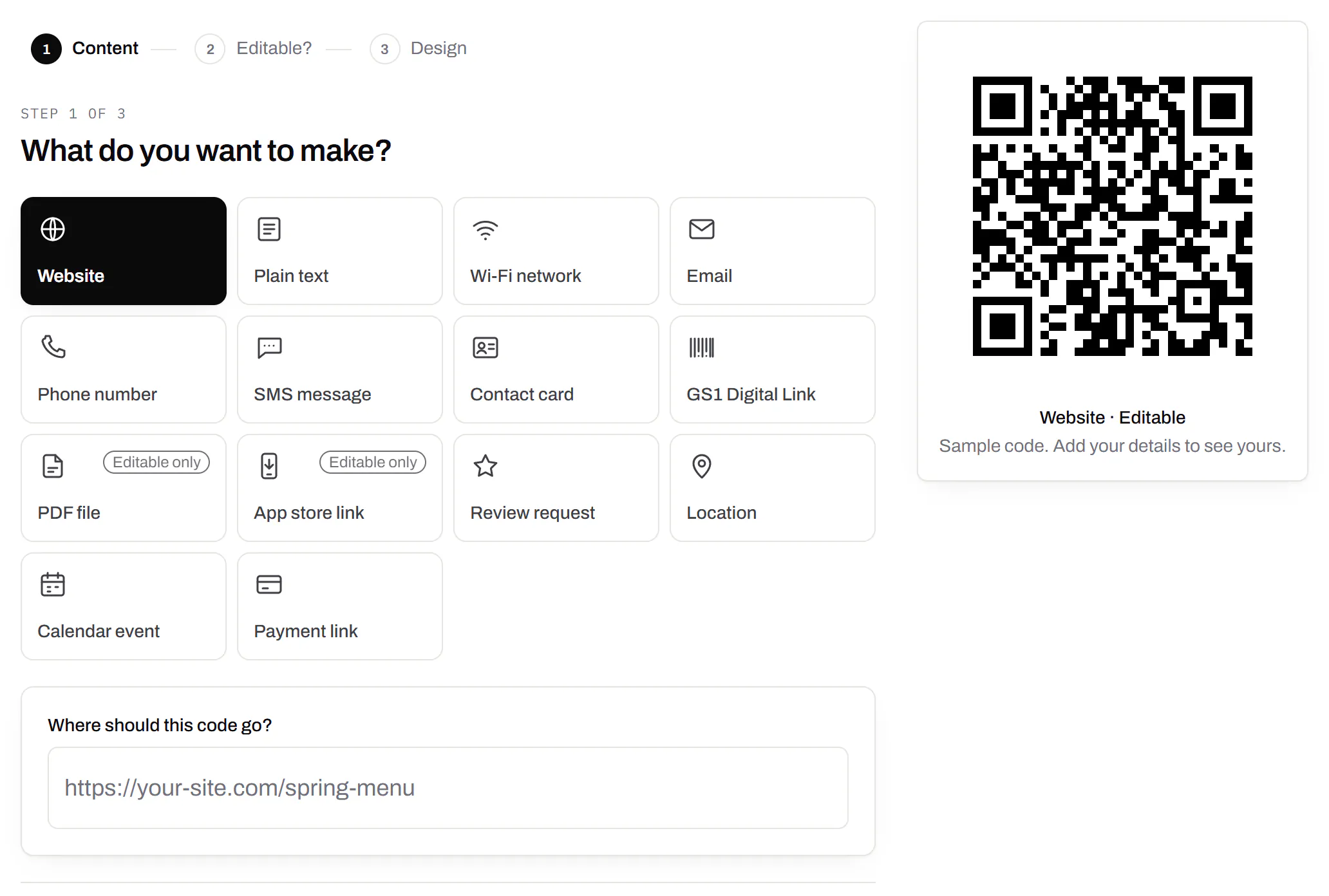
The first step of making a code: a grid of the kinds of code on offer - website, plain text, Wi-Fi network, email, phone number, SMS message, contact card, GS1 Digital Link, PDF file, app store link, review request, location, calendar event and payment link, with PDF and app store marked editable only - Website chosen, and a preview of the code beside it.
Create a code · what to make sample data

PDF codes you can update

Upload a PDF, print the code, swap the file later.

We host the file and the code opens it. Upload a new version and the same printed code opens that one, with the old file kept in its history in case you need it back.

Every plan, Free included

PDF to QR code
Destination history for a café’s catering-menu PDF code: the summer and spring menus and last year’s, each replaced on a date with a note, and each one a button away from being restored.
A PDF code · file history sample data

Your logo in the middle

Upload any image; we size it so the code still scans.

PNG, JPEG, WebP or GIF, up to 15 MB - we shrink it ourselves, so nobody has to compress a file first. Error correction goes up to make room, and the logo is never allowed to cover more of the pattern than the code can lose.

Every plan, Free included

The design panel of a coffee roaster’s bag code: espresso modules on cream with the roaster’s bean roundel in the middle, the logo field, and error correction locked to Highest because the code has a logo.
A bag code · design with a logo sample data

Print-ready downloads

PNG and SVG on every plan, and a PDF for the printer.

PNG for screens and quick jobs, SVG for anything that gets scaled, and a print-ready PDF on Starter and up.

PNG and SVG on every plan · PDF on Starter and up

A table-tent code’s own page: the printed code in espresso brown with a SCAN FOR MENU label, its short link on the café’s own domain and PNG, SVG and PDF downloads, beside the address it opens and a box for a new one, with the note that changes apply without reprinting.
A code’s page · downloads sample data

Folders and tags

Keep one location’s or one campaign’s codes together.

Put codes in a folder per shop, listing or campaign and filter the list by it. Deleting a folder never deletes a code - they move to No folder, and you can undo it.

Starter and up

A coffee roaster’s codes filtered to the Retail bags folder: the house blend, Ethiopia Guji and decaf bag codes, each with its tags - 12oz, house blend, single origin, brew guide, decaf - its short link and its scans.
Your QR codes · one folder, tagged sample data

Campaign presets

Saved UTM parameters, so printed scans are not “direct”.

A printed code arrives in your web analytics as direct traffic. A preset fills in source, medium and campaign in one click, so the flyer and the table tent show up as themselves.

Starter and up

A coffee company’s Spring flyers campaign preset: source flyer, medium print, campaign spring-2026 and content farmers-market, with a preview of the full link a scan of a code using the preset opens.
Settings · campaign presets sample data

City-level scan locations

Which towns the scans came from, not only which countries.

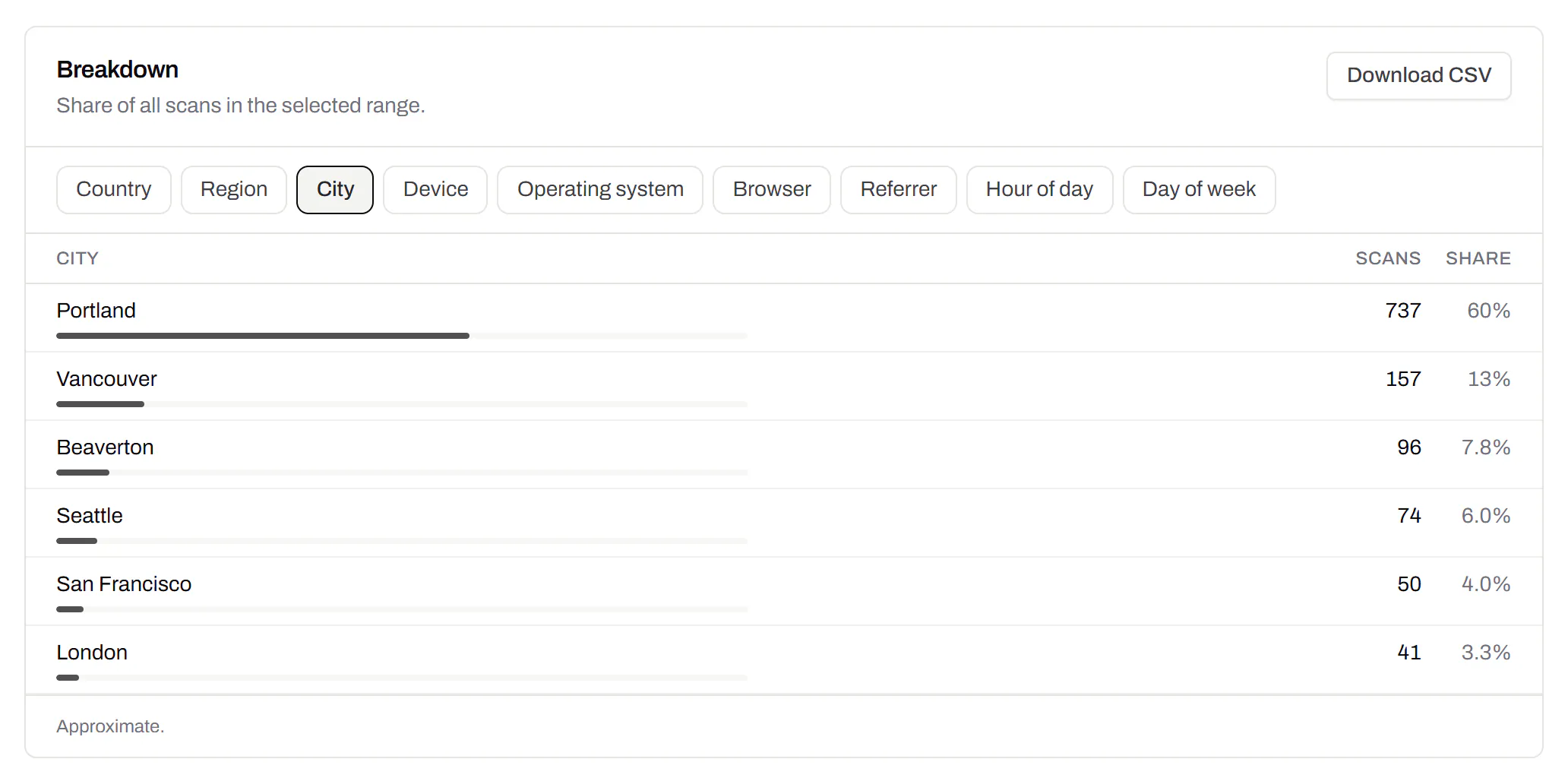
Scans by city and region for each code, and towns on the live map. Coarse on purpose: the place the phone’s network reports, never a street or a precise position.

Pro and Business

Scans of a café’s table-tent code by city, the top six: Portland with 60%, then Vancouver, Beaverton, Seattle, San Francisco and London, each with its count, a bar and its share.
A code’s analytics · city sample data

CSV export

Daily scans per code, in a spreadsheet.

Download scans and unique visitors by day for one code or all of them - with each code’s name and short link - as CSV for your own reports, or for whoever asked how the campaign did.

Pro and Business

The foot of a code’s analytics: the Breakdown card on referrers - every scan straight from the camera - with its own Download CSV button, and under it the Export panel, which downloads scans and visitors per day as CSV.
A code’s analytics · export sample data

Webhooks

Your server hears about every scan and every change.

Pick the events - a scan, a code made or changed, a form answered, a QR Menu edited - and give us an address. Each one arrives as a signed POST, retried if your server is down, and every delivery is listed with the response it got.

Business

The API and webhooks
A webhook endpoint that hears about every scan and code update, with who set it up, a signing secret hidden until an owner or admin reveals it, and its last deliveries, each marked delivered with the response it got.
Webhooks · recent deliveries sample data

An API for your own software

Make codes, re-point them and render files from your own code.

A REST API for dynamic codes and short links: make them, change where they go, render SVG, PNG or PDF, add your own domains, and change hundreds of codes in one request. No-code tools like Zapier, Make and n8n call it with a plain HTTP step. Every request carries your key, and a key only ever touches its own workspace.

Pro and Business

Every endpoint, with a playground
The API screen listing a coffee company’s keys - one for a menu sync, one for a label printer, one revoked - each with its prefix, who created it, when it was made and when it was last used.
API keys · one per integration sample data

Separate workspaces

One subscription, a workspace per brand or client.

Each workspace has its own codes, team and analytics, so a client never sees another client’s. Up to 10 under one subscription.

Business

The Workspaces panel in settings: how many of the plan’s workspaces are in use, what happens to all of them if the subscription ends, and a field to name and create another one.
Settings · workspaces sample data

Priority email support

Paid plans’ emails are answered first.

A person reads every message. On a paid plan yours is answered before free accounts’ - an order we keep, not a promised hour. Your plan and workspace go along with it, so nobody has to ask which account is yours.

Starter and up

The support page on a Business plan: a note that a person reads every message and this plan’s is answered before free accounts’, a form to write in, and the plan and workspace that are sent along with it.
Contact support · Business plan sample data

Your data, to take or delete

A full export any time, and deletion you can take back.

Download everything - codes, history, scans, form answers and the files you uploaded - as one .zip with spreadsheets inside. Deleting the account gives you 30 days to change your mind, and your printed codes keep working until then.

Every plan, Free included

Account settings: a button to download everything the account holds, and a separate panel to delete the account, which can be undone for 30 days.
Settings · your data sample data
Scan a QR code or barcode from an image - QRSalt